
How To Protect Your Private Data From Android Apps
The method is quite simple and just need a rooted android device that will allow the Xposed installer to run on the device. And after having the Xposed installer you will be using an Xposed module to disallow the apps to have access to your personal or say private data. For this follow the guide below.
Steps To Protect Your Private Data From Android Apps:
Step 1. First of all, you need a rooted android as Xposed installer can only be installed on a rooted android, so Root your android to proceed for having superuser access on your android.
Step 2. After rooting your Android device you have to install the Xposed installer on your android and thats quite lengthy process and for that, you can proceed with our Guide to Install Xposed Installer On Android.
Step 3. Now after having an Xposed framework on your Android the only thing you need is the Xposed module that is DonkeyGuard – Security Management the app that will allow you to manage the media access for apps installed on your device.
Step 4. Now install the app on your device and after that, you need to activate the module in the Xposed installer. Now you need to reboot your device to make the module work perfectly on your device.
Step 5. Now launch the app and you will see all the apps that are currently installed on your device.
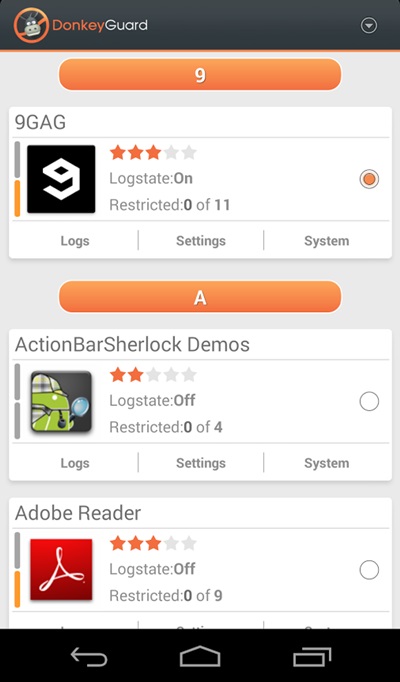
Step 6. Now edit the media permission for the apps that you don't want to have access to your media with private data.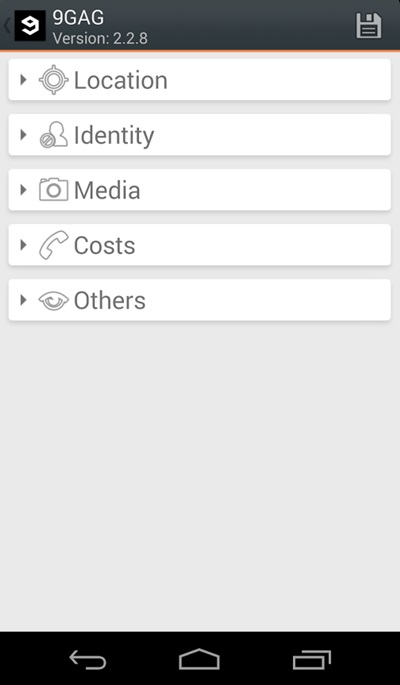
That's it, you are done! now the app will disallow the media access to that apps.
Manually Checking App Permission
Well, our Android operating system offers a nice feature in which we can manage a single app's permission. However, you need to have Android 6.0 Marshmallow or a newer version to get the option.
Step 1. First of all, open Settings and then tap on 'Apps'.

Manually Checking App Permission
Step 2. Now you will see the list of apps that are currently installed on your Android smartphone. Now you need to select the app, and then you will see 'Permissions.'

Manually Checking App Permission
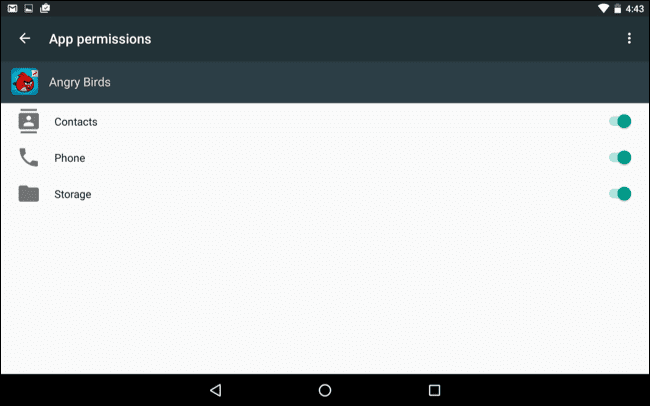
Step 3. Now it will open a new window, which will show you all permissions that you have granted to the app like Camera access, contacts, Location, microphone, etc. You can revoke any permissions as per your wish.
Manually Checking App Permission
Well, the same thing you need to perform if you feel that you have installed some suspicious app on your Android. By this way, you can protect your private data from Android apps.
Read more
- Pentest Tools Review
- Pentest Tools Github
- Hacker Tools Apk Download
- Hacking Tools For Windows
- Pentest Tools Kali Linux
- Pentest Tools List
- Pentest Tools For Ubuntu
- Pentest Reporting Tools
- Hacker Tools Apk Download
- Nsa Hacker Tools
- Hacking Apps
- Hacking Tools Free Download
- Pentest Tools Online
- Computer Hacker
- Hack Tool Apk No Root
- Hack Apps
- Wifi Hacker Tools For Windows
- Hacker Tools Hardware
- Hacker Tools
- Hacker Tools For Mac
- Hacker
- Pentest Automation Tools
- Pentest Tools Alternative
- Hacking Tools Usb
- Hack App
- Hacker Tools 2020
- Tools 4 Hack
- What Are Hacking Tools
- Pentest Tools For Android
- Hacking Tools Online
- Tools Used For Hacking
- Pentest Tools Online
- Pentest Tools Framework
- Growth Hacker Tools
- Pentest Tools List
- Hackrf Tools
- Hacker Tools For Windows
- Best Hacking Tools 2020
- Pentest Tools Linux
- Bluetooth Hacking Tools Kali
- Hacking Tools Mac
- Hacker Search Tools
- Hacking Tools Usb
- Easy Hack Tools
- Hack Tools Online
- Hacking Tools For Windows 7
- Hacking Tools For Windows Free Download
- Hacker Tools Hardware
- Pentest Tools Online
- Best Hacking Tools 2019
- Hacker Search Tools
- Hacking Tools Kit
- Hacker Tool Kit
- Hacking Tools Usb
- Hacking Tools Download
- Best Pentesting Tools 2018
- What Is Hacking Tools
- Hacker Security Tools
- Hak5 Tools
- Pentest Tools Review
- Easy Hack Tools
- Hacking Tools Name
- Pentest Box Tools Download
- Hacker Tools Linux
- Pentest Tools Kali Linux
- How To Hack
- Hacking Tools Usb
- Hacker Search Tools
- Hack App
- Hacker Tools For Mac
- Github Hacking Tools
- How To Make Hacking Tools


No comments:
Post a Comment